
Caching Explained: Why 1 Setting Can Make Your Website 5× Faster
By Auditbly
•December 4, 2025
•8 min read
We’ve all been there: you meticulously optimize your code, compress your images, and ensure your database queries are lightning-fast. You push to production, excitedly refresh the page, and... it’s still sluggish. Why? Because the bottleneck isn't always in the code you write; it's often in the data transfer and retrieval process, and that's where caching steps in.
Caching isn't a complex framework; it’s a deceptively simple concept rooted in efficiency: don't do the same work twice. If a user requests a file, and you know that file hasn't changed, why make the server process the request, pull the file from storage, and send it over the wire again? Instead, you store a copy closer to the user, in a cache.
Effective caching is the single most impactful, often low-effort way to radically improve your website's performance and, crucially, your Core Web Vitals.
Figure: SEO audits, accessiblity and performance audits intersect and complement each other.
What Caching Actually Is (And Isn't)
At its heart, a cache is just a temporary storage area for data that can be retrieved quickly. Think of it like a chef’s mise en place. Instead of chopping vegetables every time a customer orders a salad, the vegetables are pre-chopped and stored right next to the cutting board, ready for immediate use.
The goal is to serve content without requiring the full journey:
- Full Request Journey (Slow): User Browser Internet DNS Lookup Your Server Server Processing Database Query Server Responds Internet User Browser.
- Cached Journey (Fast): User Browser (Finds cached copy locally) Instant Display.
The beauty of caching is that it can happen at multiple levels, creating layers of speed and redundancy.
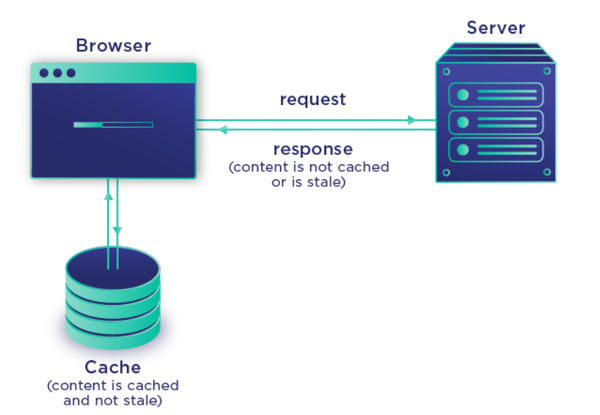
Figure: How caching works under the hood.
The Three Layers of Caching Mastery
To ensure content is delivered as fast as possible, you want the cache to be as physically close to the user as possible. This brings us to the three most common and powerful caching types:
1. Browser Caching (The Closest Cache)
This is the most powerful type for repeat visitors. When a browser first loads a page, it downloads assets like images, CSS files, and JavaScript bundles. Browser Caching (or client-side caching) uses HTTP headers, specifically Cache-Control and Expires, to tell the user's browser: "Keep this image stored locally for the next 30 days."
The next time that user visits your site, the browser doesn't even send a request to your server for those static assets; it instantly pulls them from the user's local hard drive. The result is a near-instant load time.
2. Server-Side Caching (The Origin Cache)
This cache lives directly on your web server and prevents the server from needing to run complex code or database queries repeatedly. Instead of dynamically building the HTML for your homepage on every request, the server stores a static copy of that finished HTML output.
This is critical for high-traffic sites where database calls are expensive. When a user requests the page, the server can instantly fetch the prepared HTML from memory (like Redis or Memcached) rather than spending milliseconds or seconds executing code.
3. CDN Caching (The Global Cache)
Content Delivery Networks (CDNs), like Cloudflare or Akamai, introduce an intermediary layer. They take your static assets (and sometimes dynamic content) and distribute copies across a global network of servers (Points of Presence, or PoPs).
When a user in London visits your site hosted in New York, the CDN serves the content from the closest PoP in Europe. This drastically reduces the latency caused by physical distance and massively reduces the load on your origin server. For large, global audiences, CDN caching is non-negotiable for top-tier performance.

Figure: Three core layers of caching mastery.
Caching Pitfalls: When Efficiency Becomes a Liability
Caching is a double-edged sword. If misconfigured, it can lead to users seeing stale content, a massive headache, especially on e-commerce sites where stock or pricing changes frequently.
Here are the most common caching faults we detect:
- Missing or Misconfigured
Cache-ControlHeaders: Setting headers likeCache-Control: no-cacheor giving static files a very short expiry time (e.g., 5 minutes) essentially defeats the purpose of caching, forcing full reloads. Conversely, setting dynamic content to cache for 1 year can cause stale data. - Neglecting Cache Busting: If you update a CSS file, its URL should change (e.g.,
styles.v2.cssorstyles.css?v=1678886400). If the URL doesn't change, the user's browser will keep serving the old version from their local cache, and they'll never see your update. Auditbly looks for assets with long cache headers that aren't properly versioned. - Over-Caching Dynamic Content: Caching the entire output of a personalized page (e.g., a logged-in user's dashboard) is dangerous, as the next user might see the previous user's sensitive data. Vary headers must be used carefully to prevent this leakage.
Properly implemented, a single, correctly configured set of Cache-Control headers for your static assets can be that one setting that instantly shaves seconds off your load time, massively boosting your First Contentful Paint score.
Effective caching is foundational to a fast, modern web experience. It moves the effort away from the server and closer to the user, creating a faster, more reliable experience for everyone.